- No products in the cart.




DHL UPS DHL UPS
Shipping & Returns Shipping & Returns



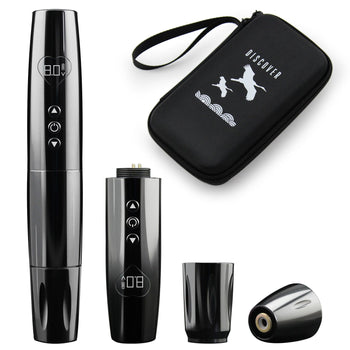
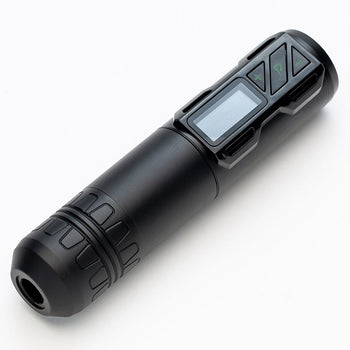
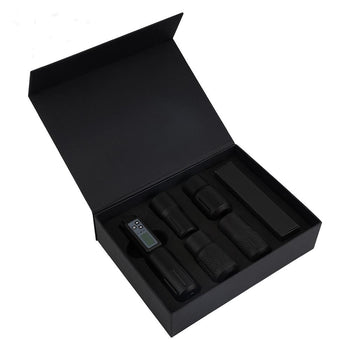
· G4 Tattoo Machine × 1
· 18350 Tattoo Battery 1600mAh × 2
· 18500 Tattoo Battery 2000mAh × 2
· 5.0mm+4.5mm+4.0mm+3.5mm Stroke Cam × 1
· Universal Battery Charging Dock × 1
· Fast Charging Plug × 1
· Extra Battery Cap (for Long Battery) × 1
· Lubricant 10ml × 1
· Sealing O-rings × 6
· Wrench Set × 1
· User Manual × 1
· Storage Case× 1

How to set the Softness and hardness mode for operation?
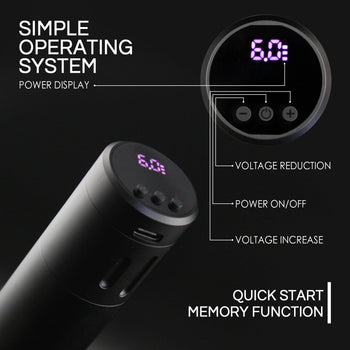
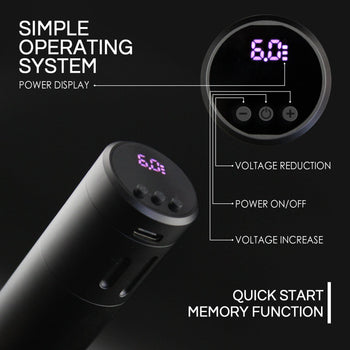
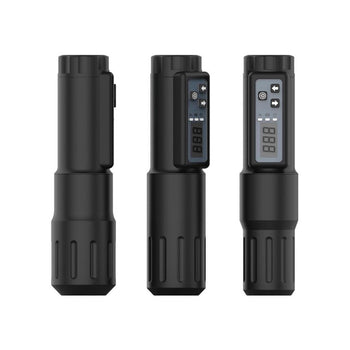
① Double-click the M button to switch to the M1 interface.
② Single click M button to switch SOFT / MEDIUM / HARD
③ Click +/- buttons to adjust strike speed.
④ Single click power button to Start/Stop device.
⑤ Hold the + and − buttons for 3 seconds to reset the timer.
How to set the frequency mode for operation?
① Double-click the M button to switch to the M2 interface.
② Click the +/- buttons to adjust the frequency.
③ Click M button 1 time to enter voltage adjustment mode.
④ Click the +/- buttons to adjust the voltage.
⑤ Single click power button to Start/Stop device.
⑥ Hold the + and − buttons for 3 seconds to reset the timer.
How to set up standard voltage drive mode?
① Double-click the M button to switch to the M3 interface.
② Click the +/- buttons to adjust the voltage.
④ Click the +/- buttons to adjust the voltage.
⑤ Single click power button to Start/Stop device.
⑥ Hold the + and − buttons for 3 seconds to reset the timer.

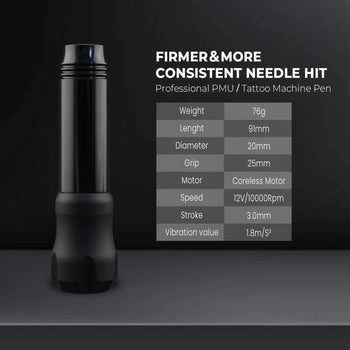
· Output Voltage: 4V–12V
· Increment/Decrement Voltage Interval: 0.1V/0.5V
· Maximum Output Current: 1A
· Assembled Length:
· With short battery cap: 124mm x 32mm
· With long battery cap: 132mm x 32mm
· Assembled Weight:
· With 18500A Battery: 172.8g (6.09oz)
· With 18650A Battery: 186.5g (6.57oz)
· Battery Life:
· Varies according to your settings+operating conditions
· 18500A Battery: ~5.5 hours
· 18650A Battery: ~6.5 hours
· Battery Caps:
· 18350 Battery uses short cap
· 18500 Battery uses long cap
The G4 Torque is designed to operate within a safe voltage range of 4V (minimum) to 12V (maximum).
Actual voltage may vary depending on needle setup or cartridge brand.
Adjust voltage as needed to achieve optimal performance within the recommended range.
Gods Rotary guarantees that the device will operate properly when used as intended. If the machine is found to be defective due to manufacturing faults, Gods Rotary will repair or replace it at no cost within two years from the date of purchase.
This warranty is void if the device shows evidence of tampering, disassembly, improper handling, impact damage, excessive moisture exposure, use with non-membrane cartridges, or any other damage that affects normal operation.
• Depending on the cartridge brand used, slightly loosen the grip if needed to ensure proper motor operation.
• Do not operate above the maximum voltage.
• Clean using only FDA-approved cold sterilization solutions.
• Do not autoclave – this device is not autoclavable.
• Use only original (KP) batteries or those from Sony, LG, Samsung, or Panasonic.
· G4 Tattoo Machine × 1
· 18350 Tattoo Battery 1600mAh × 2
· 18500 Tattoo Battery 2000mAh × 2
· 5.0mm+4.5mm+4.0mm+3.5mm Stroke Cam × 1
· Universal Battery Charging Dock × 1
· Fast Charging Plug × 1
· Extra Battery Cap (for Long Battery) × 1
· Lubricant 10ml × 1
· Sealing O-rings × 6
· Wrench Set × 1
· User Manual × 1
· Storage Case× 1
How to set the Softness and hardness mode for operation?
① Double-click the M button to switch to the M1 interface.
② Single click M button to switch SOFT / MEDIUM / HARD
③ Click +/- buttons to adjust strike speed.
④ Single click power button to Start/Stop device.
⑤ Hold the + and − buttons for 3 seconds to reset the timer.
How to set the frequency mode for operation?
① Double-click the M button to switch to the M2 interface.
② Click the +/- buttons to adjust the frequency.
③ Click M button 1 time to enter voltage adjustment mode.
④ Click the +/- buttons to adjust the voltage.
⑤ Single click power button to Start/Stop device.
⑥ Hold the + and − buttons for 3 seconds to reset the timer.
How to set up standard voltage drive mode?
① Double-click the M button to switch to the M3 interface.
② Click the +/- buttons to adjust the voltage.
④ Click the +/- buttons to adjust the voltage.
⑤ Single click power button to Start/Stop device.
⑥ Hold the + and − buttons for 3 seconds to reset the timer.
· Output Voltage: 4V–12V
· Increment/Decrement Voltage Interval: 0.1V/0.5V
· Maximum Output Current: 1A
· Assembled Length:
· With short battery cap: 124mm x 32mm
· With long battery cap: 132mm x 32mm
· Assembled Weight:
· With 18500A Battery: 172.8g (6.09oz)
· With 18650A Battery: 186.5g (6.57oz)
· Battery Life:
· Varies according to your settings+operating conditions
· 18500A Battery: ~5.5 hours
· 18650A Battery: ~6.5 hours
· Battery Caps:
· 18350 Battery uses short cap
· 18500 Battery uses long cap
The G4 Torque is designed to operate within a safe voltage range of 4V (minimum) to 12V (maximum).
Actual voltage may vary depending on needle setup or cartridge brand.
Adjust voltage as needed to achieve optimal performance within the recommended range.
Gods Rotary guarantees that the device will operate properly when used as intended. If the machine is found to be defective due to manufacturing faults, Gods Rotary will repair or replace it at no cost within two years from the date of purchase.
This warranty is void if the device shows evidence of tampering, disassembly, improper handling, impact damage, excessive moisture exposure, use with non-membrane cartridges, or any other damage that affects normal operation.
• Depending on the cartridge brand used, slightly loosen the grip if needed to ensure proper motor operation.
• Do not operate above the maximum voltage.
• Clean using only FDA-approved cold sterilization solutions.
• Do not autoclave – this device is not autoclavable.
• Use only original (KP) batteries or those from Sony, LG, Samsung, or Panasonic.




![DISCOVER DEVICE® Tattoo Machine 4.5mm Stroke NM3 [2026 Edition]](http://discoverdevice.com/cdn/shop/files/logo_350x350_crop_center.jpg?v=1756286440)